Patient experience

Make it easier for patients to say yes to care.

Coordinate scheduling, reminders, intake, secure messaging, follow-up, and payments around one connected patient record.

Book a demo
A front desk coordinator showing a patient her options on a tablet
DenteCureLive
Connected workflow

Patient journey

Next best actionLess friction before, during, and after every appointment.

Ready for review
Core capabilities

Purpose-built depth.
Shared practice context.

Less friction before, during, and after every appointment.

1:00 PM
2:00 PM
3:00 PM
Cleaning & examDr. Chen
4:00 PM
Booked online

Self-scheduling

Patients book, reschedule or cancel online from the times you choose to offer.

Avery Moore(512) 555-0134

Automated reminders

Reminders go out by text and email on your schedule, with a link to move or cancel that updates the appointment.

Before Tuesday’s visit
Registration
Medical history
Insurance card
Consent signed

Digital intake

Registration, medical history and insurance details arrive before the patient does.

Live$185balance paid from a text linkStatement DC-1048 · receipt sent

Payment links

Send a secure link for a balance or copay, and see it post the moment it is paid.

How it works

A visit that starts before the patient arrives.

  1. Book

    Patients pick a time online or by text, from real availability in your schedule.

  2. Prepare

    Registration, medical history, and insurance details arrive before the visit, not on a clipboard in the waiting room.

  3. Remind

    Confirmations and reminders go out on the patient's preferred channel, with a link to move or cancel that updates the schedule straight away.

  4. Follow up

    Recall, unscheduled treatment, and open balances each get a next message, so nobody drifts out of care.
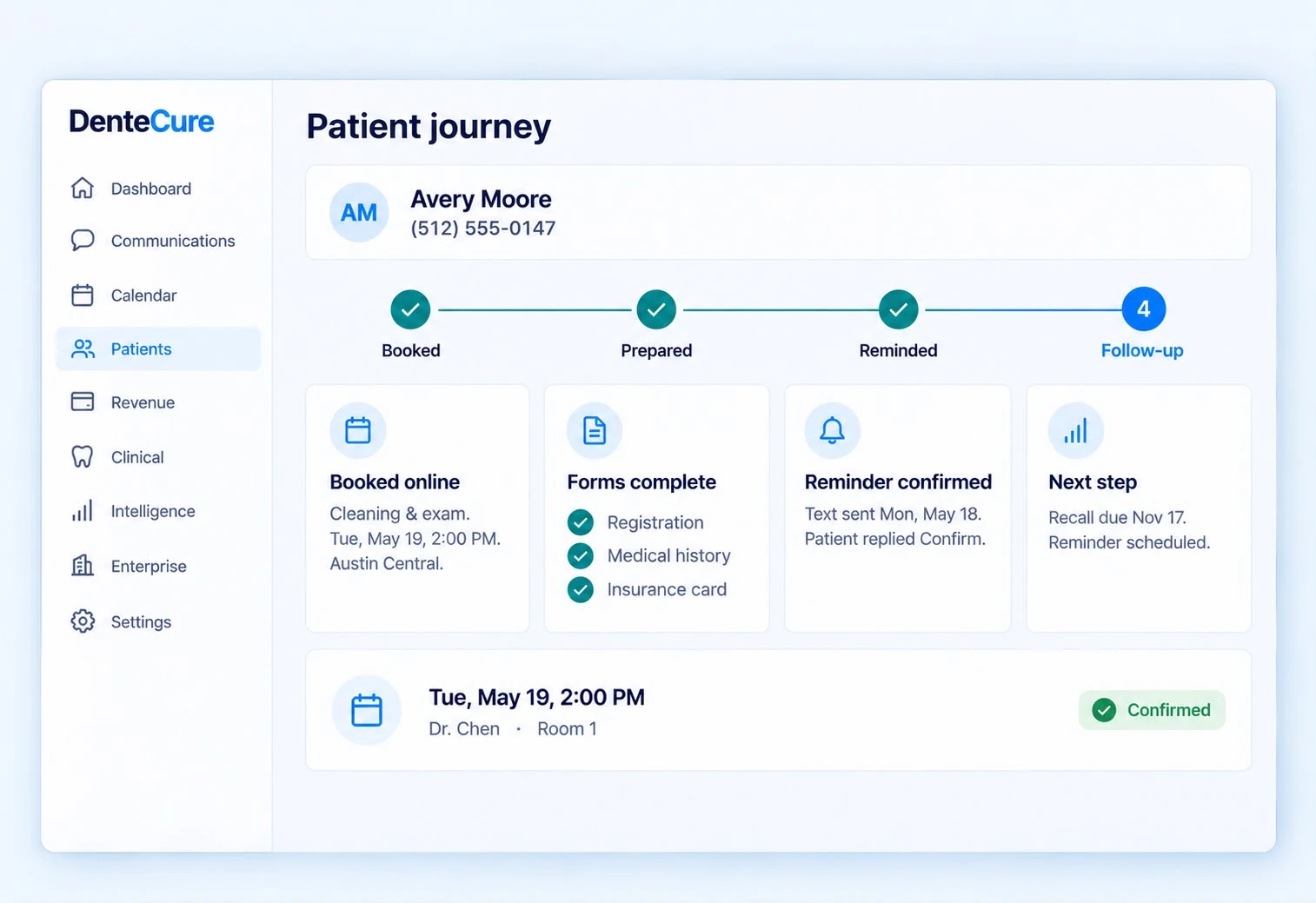
Patient journey in DenteCure: A visit that starts before the patient arrives, shown with sample data

Sample details for illustration. No patient data.

A team member showing a patient their next appointment on a tablet
Patient outreach

Follow-up that still feels personal.

Coordinate reminders, recovery, forms, reactivation, and balance messages around the same patient context your team already uses.

  • Automated reminders and confirmation
  • Missed-call recovery and reactivation
  • Secure forms and balance follow-up
Book a demo
A treatment coordinator walking a patient through his plan at a table
Treatment acceptance

Help patients say yes before they leave.

Walk patients through the plan, the estimate, and their coverage in plain language, then book the next visit while the decision is still fresh.

  • Plan and estimate side by side
  • Coverage explained before the patient asks
  • Next visit booked at checkout
Book a demo
Everything inside

What patient journey includes.

Coordinate scheduling, reminders, intake, secure messaging, follow-up, and payments around one connected patient record.

Scheduling

  • Online booking from your real schedule
  • Reschedule and cancel from a link or the patient app
  • Changes the front desk sees at once
  • Recall reminders on each patient's interval

Before the visit

  • Digital registration and medical history
  • Consent forms signed on the phone
  • Insurance card capture
  • Eligibility checked ahead of the visit

After the visit

  • Payment links by text and email
  • Treatment follow-up sequences
  • Reactivation outreach
  • Two-way messages in the patient app
A patient checking in at the front desk
Designed to connect

This workflow never lives in isolation.

DenteCure carries useful context across the patient journey, so each action helps the next team move faster and with more confidence.

  • One-tap responses
  • Secure messaging
  • Automated follow-up
  • Role-aware team access
Connected signals Live
  1. 1Connected signalSelf-scheduling
  2. 2Connected signalAutomated reminders
  3. 3Connected signalDigital intake

ResultLess friction before, during, and after every appointment.

What changes

What patient journey changes, for everyone at the practice.

Patient
BeforePhone tag

Booking means calling during office hours

With DenteCureTwo taps

Book, confirm and pay from a text

Before
10 hphone hours only
Front deskOnline bookingClosedBooking only by phone, in office hours
Patient journey, one of six products in the DenteCure platform.Book a demo
Front desk
BeforeClipboards

Forms filled in the waiting room

With DenteCureReady

Registration and history done before arrival

Before
10 hfront desk only
Front deskOnline formsClosedForms filled in on a clipboard
Patient journey, one of six products in the DenteCure platform.Book a demo
Treatment coordinator
BeforeDrifting

Unscheduled treatment waits for someone to call

With DenteCureFollowed up

Every open plan has a next message

Before
10 hcalls only
Front deskAutomated follow-upIdleUnscheduled treatment waits for a call
Patient journey, one of six products in the DenteCure platform.Book a demo
Questions

What practices ask first.

Do patients need to download an app?

No. Booking, forms, reminders and payments open in the phone's browser from a text or email link, and the patient app, which also opens from a link, adds messages, records and bills in one place.

Can we control which times patients can book?

Yes. You choose the appointment types, providers, and hours that appear online; everything else stays with the front desk.

How are reminders sent?

By text and email, on the schedule you set for each appointment type. Patients move or cancel from the link in the reminder or in the patient app, and the schedule updates straight away.

Is patient information protected in forms and messages?

Yes. Forms and messages are encrypted in transit and at rest, and they live on the patient's record under your practice's access rules.

Bring this workflow into focus

See patient journey in action.

Book a demo